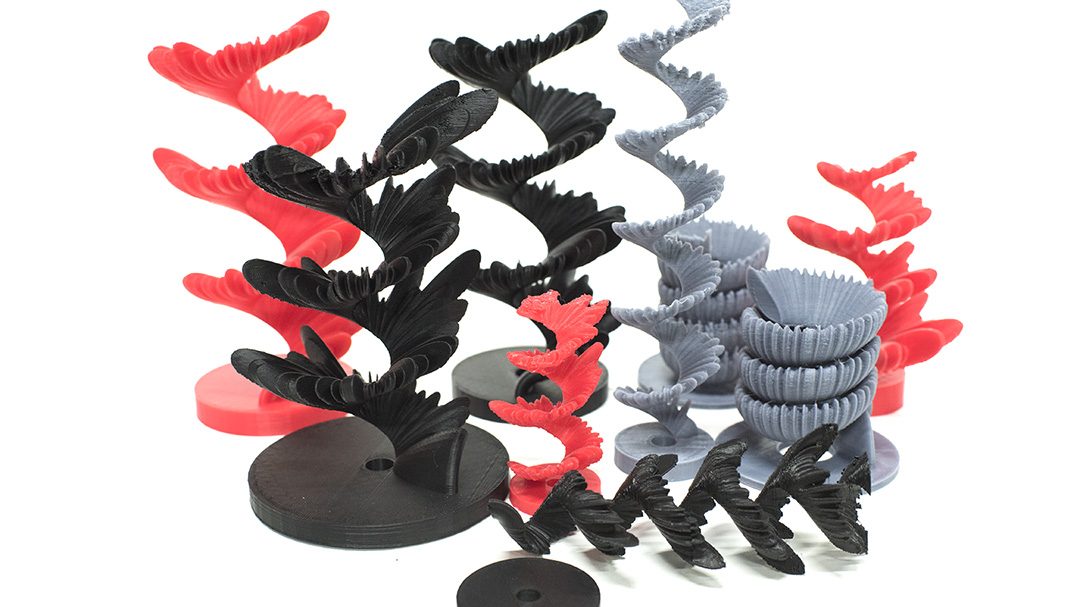
Cross Squawk at Ravensbourne

Cross Squawk by Pixelpusher

After over a year, I’m happy to announce that my project Cross Squawk is being shown at Ravensbourne!

There is a detailed record and explanation of the project and philosophy behind it here.

The opening event will be 7-9PM on Wednesday 17th April at Ravensbourne:

Get directionsKML-LogoFullscreen-LogoQR-code-logoGeoJSON-LogoGeoRSS-LogoWikitude-Logo
Ravensbourne

loading map - please wait...

Ravensbourne 51.501673, 0.005750 Ravensbourne, right across from the O2 Areana.  Take the Jubilee to North Greenwich and walk for 30 seconds, or the Emirates Airline (cable car)

You can find a detailed presentation on it here.

Cross-Squawk is an art installation by Evan Raskob (Senior Lecturer, Web Media BA, Ravensbourne: http://pixelist.info) investigating the unspoken ideas of individual identity, creativity, and social class, and how they reveal themselves in the patterns of communication across different social groups and classes in public spaces. Modeled on the territorial songs of city birds such as sparrows, the installation consists of a modified flock of sculptural “birds” with human voices, recorded from the UK, Budapest (HU), and Helsinki (FI) residents by the artist during the workshops where they created their individual birds. These sculptures sing their territorial (or friendly, depending on your point of reference) songs in a call-and-response pattern, modeled on the dispersion of birdsong in the wild. The birds are composed of different parts that represent important aspects of social status. These were determined by questions asked of participants in workshops, who then coloured the birds by hand according to their individual personalities. They then recorded the bird’s song, in the form of what they would cry out to their most intimate friends or family members. This project was part of City Noises (http://citynoises.org) in association with Stream Arts, Crucible Studio (Helsinki, Finland), Ravensbourne (London, UK) and Szövetség’39 (Budapest, Hungary) and supported by Ravensbourne and the EU Commission.

Computational Designer In Residence at Ravensbourne

Ravensbourne, the venue for State of the Browser 2011

I’ve recently been appointed as Computational Designer at Ravensbourne, which allows me to continue developing open source software for art and design and also teaching people how to make things using software (and programmable hardware).  Just as in my TEDx talk about the need for teaching technology and creativity, Ravensbourne has graciously agreed that “Computational Art and Design,” as we’re calling it, are fast becoming sought-after skills for art and design students.  Just look at websites like CreativeReviewCreativeApplications and CreateDigitalMotion to get an idea of what the community and industry are up to.

What am I doing here? I’m working across all years and courses at Ravensbourne, helping to both inspire and guide students in using computational methods like programming in environments like Processing, Cinder, and OpenFrameworks (and many more) and using programmable hardware such as Arduino.  It’s more than just teaching technology – I see computers and computing as a game-changed, a drastic shift in how we deal with the world around us that we haven’t seen since we learned to cook with fire about 800,000 years ago (give or take a few millennia).

I’m at Ravensbourne two days per week, Tuesdays and Thursdays.  On Tuesdays I host a “Code Lunch” AKA a “Coding Knitting Circle with Food” from 12:30-1:30 for students, with occasional guest speakers drawn from the local talent.  On Thursdays I run a special, slightly more focused workshop on programming and computational design from 10:30AM-12:30PM where I go more in depth into concepts and methods.

As part of the residency, for the Kinectica Art Fair this year (running from 7-9 February 2012) we’re contributing to a large-scale projection installation.  I’ve led the students in a series of sketches based on the generative art pioneer John Whitney:

Monomatic (Nick Rothwell & Lewis Sykes), Noise Machine (Mick Grierson), pixelpusher (Evan Raskob) with computational design students from Ravensbourne and Transphormetic (Paul Prudence) present a series of real-time, code-based audiovisual works inspired by, interpreting and extending Whitney’s animated films – projected at large scale onto the rear wall of the P3 exhibition space throughout KAF ’12.

Building on John Whitney’s aesthetic of simple dot and line, bold colour and dynamic geometric form they re-imagine his two- dimensional patterns in new forms: three- dimensional shapes, projection-mapped patterns and even anaglyph 3D. Some also take the next step of creating sound and music to correspond directly to those visual images – something John Whitney himself never managed to realise.

Grand statements and projects aside, for my residency I’ve created a few sources of information for students:

I’ve been pretty heavy on the Google tools, partially as an experiment to see how they measure up, and partially to take advantage of G+’s great new “Hangouts with Extras,” which sounds like something you do with your dodgy friends after a late night but actually is the best classroom-in-a-box I’ve come across: voice and video chat with multiple people, screen sharing (even single windows! and participants can also share theirs with the group), and shared note-taking that automatically gets shared ownership with everyone participating in the conversation.  Clearly, this is a well-thought-out service that could be a Skype killer, except it is a little clunkier to create a hangout than to simply Skype or iChat someone.

Life, and Processingjs in WordPress

It’s been ages since I last posted, but that’s mostly because I’ve been incredibly busy on other projects, teaching, and etc.  I’ve been recently named Computational Designer in Residence at Ravensbourne, in London, thanks in no small part to Will Pearson and his vision (which I emphatically share) of injecting more coding skills and exposure into the excellent digital design process already churning through the college.

Seen here is my version of “Tron Blur” originally by the talented Dave Bollinger, whose website unfortunately doesn’t seem to exist anymore. I used it in this post for an upcoming workshop on SuperCollider by Simon Katan.

Towards that end, I’ve been experimenting a lot more with JavaScript and HTML5 in the hopes of shedding Flash forever, for good, but the amount of competitors in near-endless.  Competition and diversity are great things but too much of a good thing causes a stomach-ache (or headache).

Continue reading

Toad Particle Draw on Android

This is a bit silly – been playing with Processing, getting into the deep geometric capabilities of toxiclibs and GLGraphics and Android.

It started as a new VJ… er, “pixelist” app for live performance for a jam session celebrating our friend Olivier Ruellet’s life and untimely death last year from what we think was swine flu.

Now, I made an Android version… this technique will come to life a bit later as part of a”Build Your Own Superhero” workshop I’m co-developing with CoDesign.

Processing code (for Android only):

// Draw Particle Toads by pixelpusher
// <info@pixelist.info>
// Based on examples in the public domain by
// Andres Colubri and toxi (Karsten Schmidt)
//
// Uses toxiclibs - http://toxiclibs.org

import toxi.geom.*;
import toxi.geom.mesh.*;
import toxi.math.*;

TriangleMesh triMesh;

Vec3D prev=new Vec3D();
Vec3D p=new Vec3D();
Vec3D q=new Vec3D();

Vec2D rotation=new Vec2D();

boolean mouseWasDown = false;

float MIN_DIST = 7.0f;
float weight=0;

LinkedList<PShape3D> models;
PImage tex;

void setup()
{
size(800, 400, A3D);
orientation(LANDSCAPE);

models = new LinkedList<PShape3D>();

triMesh =new TriangleMesh("mesh1");

// any particle texture... small is better
tex = loadImage( "whitetoady.png");
}

void draw()
{

background(0);

// rotate around center of screen (accounted for in mouseDragged() function)
translate(width/2, height/2, 0);
rotateX(rotation.x);
rotateY(rotation.y);

// draw mesh as polygon (in white)
drawMesh();

// draw mesh unique points only (in green)
drawMeshUniqueVerts();

//hint(DISABLE_DEPTH_MASK);

screenBlend(ADD);

hint(DISABLE_DEPTH_TEST);

// now models
for (PShape3D model : models)
{
shape(model);

model.loadVertices();
for (int n = 0; n < model.vertices.length; n+=3)
{
model.vertices[n]         -= (0.0f- model.vertices[n])*0.03f;
model.vertices[n+1] -= (0.0f - model.vertices[n+1])*0.03f;
model.vertices[n+2] -= (0.0f - model.vertices[n+2])*0.03f;
}
model.updateVertices();
}

//hint(ENABLE_DEPTH_MASK);

// udpate rotation
rotation.addSelf(0.014, 0.0237);
}

PShape3D makeModel(TriangleMesh mesh)
{

PShape3D model = null;

// get unique x,y,z vertices, use with indices
float[] triVerts = mesh.getUniqueVerticesAsArray();

if (triVerts.length > 0)
{

println("Got " + triVerts.length/3 + " verts");

int[] faces = mesh.getFacesAsArray();

model = (PShape3D)createShape(triVerts.length/3, PShape3D.newParameters(POINT_SPRITES, DYNAMIC));
model.setColor(color(255));

// TESTING - MAKE SURE WE HAVE CORRECT VERTS
model.loadVertices();
for (int n = 0; n < triVerts.length; n++)
{
model.vertices[n] = triVerts[n];
}
model.updateVertices();

//model.initIndices(faces.length);
//model.updateIndices(mesh.getFacesAsArray());

//
//  for (int n=0; n<triVerts.length; n += 4)
//  {
//    println("TRIVERT["+n+"]="+ triVerts[n] +","+triVerts[n+1] +","+triVerts[n+2]);
//  }

//
// Handle colors
//
model.loadColors();

for (int i=0; i<triVerts.length/3; ++i)
{
float f = max( float(i) / (triVerts.length/3), 0.15 );
model.colors[4 * i + 0] = (1 - f) * 0.98 + f;
model.colors[4 * i + 1] = (1 - f) * 0.75 + f;
model.colors[4 * i + 2] = (1 - f) * 0.26 + f;
model.colors[4 * i + 3] = 0.8f;
}

model.updateColors();

//  float pmax = model.getMaxPointSize();
//println("Maximum sprite size supported by the video card: " + pmax + " pixels.");

model.setTexture(tex);

// Setting the maximum sprite to the 90% of the maximum point size.
//model.setMaxSpriteSize(0.6 * pmax);
// Setting the distance attenuation function so that the sprite size
// is 20 when the distance to the camera is 400.
model.autoBounds(false);
model.setSpriteSize(10, 400, QUADRATIC);
}

return model;
}

void vertex(Vec3D v) {
vertex(v.x, v.y, v.z);
}

void mouseReleased()
{
// MAKE A MODEL FROM CURRENT TRI MESH
PShape3D model = makeModel (triMesh);
if (model != null)
models.add( model );

if (models.size() > 10)
{
PShape3D first = models.removeFirst();
first.delete();
}

// clear tri mesh
triMesh.clear();
}

void mousePressed()
{
}

void mouseDragged()
{
// get 3D rotated mouse position
Vec3D pos=new Vec3D(mouseX-width/2, mouseY-height/2, 0);
pos.rotateX(rotation.x);
pos.rotateY(rotation.y);
// use distance to previous point as target stroke weight
weight+=(sqrt(pos.distanceTo(prev))*2-weight)*0.1;
// define offset points for the triangle strip

//println("weight " + weight);

//if (weight < MIN_DIST && triMeshes.size() > 0)
if (true)
{

Vec3D a=pos.add(0, 0, weight);
Vec3D b=pos.add(0, 0, -weight);

// add 2 faces to the mesh
triMesh.addFace(p, b, q);
triMesh.addFace(p, a, b);
// store current points for next iteration
prev=pos;
p=a;
q=b;
}
}

void drawMesh() {

noStroke();
fill(255,80);
beginShape(TRIANGLES);
// iterate over all faces/triangles of the mesh
for (Iterator i=triMesh.faces.iterator(); i.hasNext();) {
Face f=(Face)i.next();
// create vertices for each corner point
vertex(f.a);
vertex(f.b);
vertex(f.c);
}
endShape();
}

void drawMeshUniqueVerts() {
//  noStroke();

stroke(0,255,0);
strokeWeight(4);

beginShape(POINTS);

// get unique vertices, use with indices
float[] triVerts = triMesh.getUniqueVerticesAsArray();
for (int i=0; i < triVerts.length; i += 3)
{
vertex(triVerts[i], triVerts[i+1], triVerts[i+2]);
}
endShape();
}

void keyPressed()
{
switch(key)
{
case 'x':
//mesh.saveAsOBJ(sketchPath("doodle.obj"));
//mesh.saveAsSTL(sketchPath("doodle.stl"));
break;
case ' ':
// now models
for (PShape3D model : models)
{
model.delete();
}
models.clear();
break;
}
}

Are Jobs Obsolete?

My response to Douglas Rushkoff’s article “Are Jobs Obsolete” that has provoked a bit of discussion.
Rushkoff is an acquired taste. Really, it’s very hard to write as much as he does and make sense the entire time, and he does it pretty well by throwing some big ideas out there and provoking thought.  But sometimes a bit indelicately.
In this piece, I think it’s a great point.  As someone who hasn’t had a proper “job” for about 10 years (for better or for worse), I do feel pretty much unemployable some days.  Yet, the problem isn’t my skillset, it’s that I my experience doesn’t fit neatly into a category.  Hiring companies are given specs for jobs and they need to tick the boxes and fulfil them. Whether or not that’s good or useful doesn’t matter, so much as they need to tick those boxes because *there must be measurable performance goals*.

Augmented Reality, Dancing, Creatures

IMG_4357

Credits:

  • Production, Art Direction, Illustrations, Animation: SDNA
  • Programming, Animation: PixelPusher

Recently I was asked by the visuals company SDNA to work with them on a public art game.  This would take the form of an interactive installation, shown around Worcestershire, as part of the 12 Moves Festival of Dance.  The idea was to get people, and especially kids, dancing and moving about.

UPDATE: An iPhone/iPad version is in the works!

Read on for more about the project and the tech behind it